 |
JobTabs Job Search & Resume Builder 2013 | Submit feedback on this topic |
Glossary Item Box
|
JobTabs Job Search & Resume Builder 2013 | Submit feedback on this topic |
Whether you find a job from the browser, a search agent, or a feed, you can easily save the job into JobTabs with the click of the 'Save Job' button. While there are several factors that can affect the layout of the saved job, by and large the saved job is a near snapshot of the original. Factors that can adversely affect the layout of the saved job are your internet bandwidth, scripting used to format the page, and Macromedia Flash, among other considerations. Once saved the job posting is yours to keep and you won't even need to be connected to the internet to view it.
 |
If you cannot view the video above, please click the link below to watch it in your default browser. |
While the process of saving a job typically takes only a few seconds, there are a few items you should keep in mind.
 |
Any text you highlight in a browser window will be saved as the job title. This is an easy way to save pertinent information while saving a posted job. If no text is selected the title of the web page will be saved as the job title. |
All saved jobs are stored in the 'Saved Jobs' node under 'My Jobs' as shown below.
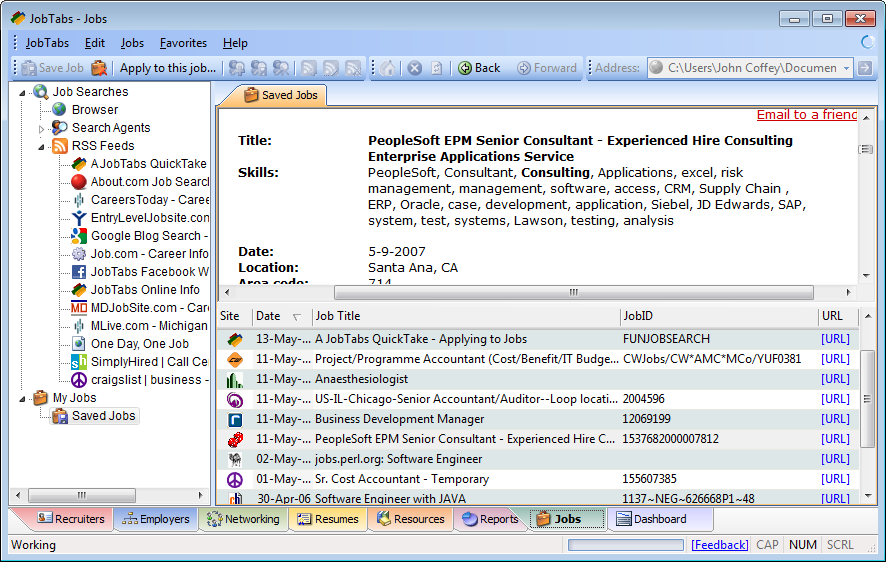
Clicking a row in the grid will allow you to view each job in the viewer above. Note, the navigation buttons are disabled. The listed jobs are not posted via the normal HTTP protocol which would warrant a back button when the next job displayed. The jobs are individual files on your hard drive. Every time you load a job you have not moved 'Forward'. You have essentially killed your browser session and have begun a new session. Now, if you navigate to a destination from a hyperlink within the saved job, then you have created an web browsing event such that there is something to go back to. You can right click the browser and click the Back button in the context menu to be back to the displayed job. If you click a saved job in the grid and then click the back button in the context menu, nothing will happen. This is because as far as the browser is concerned, when you clicked the displayed job in the grid you closed your browser and then opened the browser again to look at the job. There is no history when you open a browser for the first time.
Technical oddities aside, you should be thinking if the opportunity you have saved is something you are qualified to do. The question is not whether you have exactly what they are looking for, but whether you can convince them that you can do the job as they have presented it. Most likely you can and if you thought enough of the job to save it then maybe you should get your gumption up and pursue that opportunity.
Consider the following scenario from your childhood. Remember when you stood at the base of a tree and you were convinced you would have no problem climbing to the high branch? Then when you began to actually climb the tree you looked down and saw how high you really were? Most likely you became fearful and rationalized not climbing any higher for fear you would fall out of the tree. The same analogy can be applied to job seeking. When we consider something, we probably correctly conclude that we can do it. It is only in the throes of the challenge that we reconsider what our priorities are. As a child you could have made the high branch. Whether you made it is immaterial. You had the skills, but after looking down you reconsidered. Maybe for the right reasons, but you had the skills to make it to your destination. In the face of actually having to sell yourself to the employer you should give it a shot. It can be a fearful experience initially, but as you go traipsing through your experience you will have no trouble finding the golden bullet points you need to sell yourself. You can save yourself a lot of time and energy by,
Then, by all means, go for it.
| See Also |
Jobs: Adding Jobs From Other Sources
© 2005 - 2012 by JobTabs, LLC. All rights reserved.